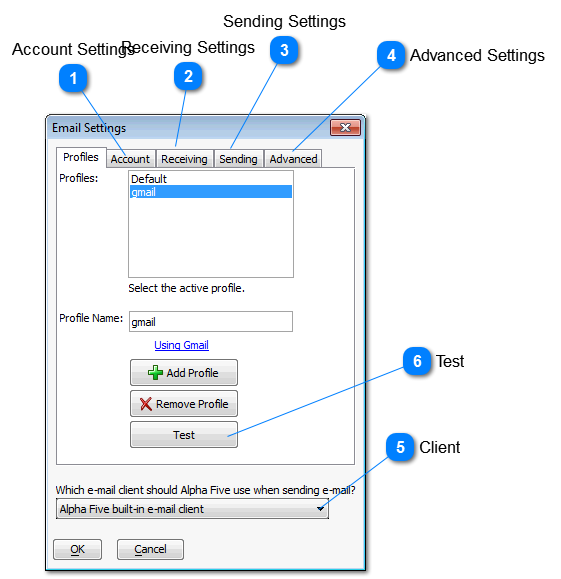
We will cover setting up a profile for using Gmail.
Setting up for other email services are similar.
Yahoo email will only work if you have a Plus account.
You can either add a profile and name it Gmail or just edit the default profile.
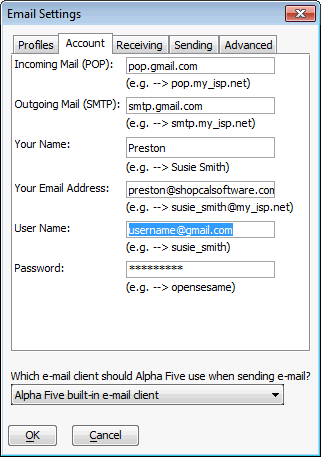
 Account SettingsFor Gmail.
-
POP should be pop.gmail.com -
SMTP should be smtp.gmail.com -
You name is the name the recipient sees. -
Your email address is the email address they will see as "From" and will reply too. -
User Name is your full Gmail email address -
Password is you Gmail password.
|
|
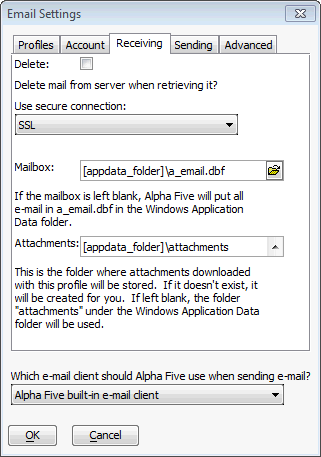
 Receiving Settings
Normally not used but set the "Use secure connection" to SSL
|
|
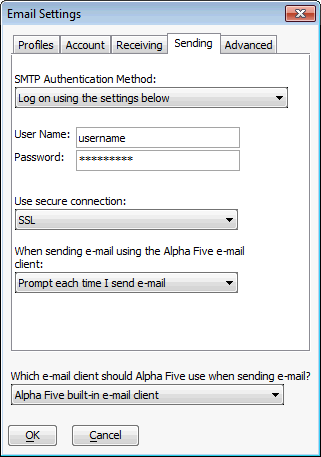
 Sending Settings
For SMTP Authentication Method you can use " Use same settings as my incoming mail server" or use the settings as described below.
In either case set the "Use secure connection" to SSL
-
User Name is your Gmail user name. -
Password is your Gmail password.
|
|
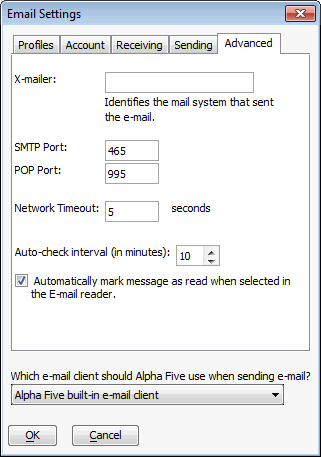
 Advanced Settings
|
|
 ClientSet this to the Alpha 5 built-in e-mail client
|
|
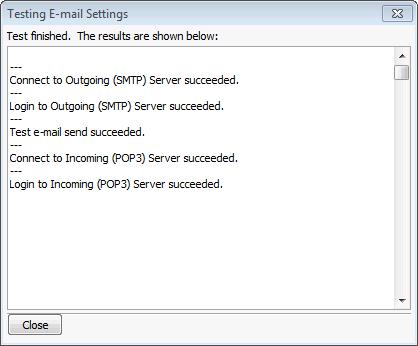
 TestIf everything is set right then you should see this.
|
|