Matrix NameThe Matrix Name can be anything you want but it must be unique
|
 Upper MatrixThe Upper part of the matrix should always be filled in first. Fill in the quantity break steps you want in the yellow boxes. The powder blue boxes will automatically fill in based on the values you put in the yellow boxes.
Next fill in the amount you will charge for each color amount for each quantity break step. You will notice in the example that there are no values for quantities 1 to 11. This tells T-Six that you have a minimum of 12 shirts.
Next fill in the percentage values that will be used for each quantity break step. Here we are using the percentages as MARGIN but you can set it to be MARKUP. Just make sure you use the same method everywhere in T-Six to avoid confusion. If you are not familiar with Margin, refer to the chart on the margin tab for how Margin relates to Markup. I recommend using Margin as it is more accurate when trying to calculate back to your starting point.
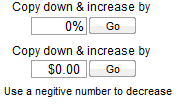
Finally you can either enter the charge values in the lower matrix or just use one of the two copydown buttons on the right side.
|
 Logic SettingsThe Logic settings tell T-Six how to use your Matrix.
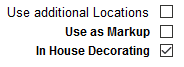
The "Use additional Locations" tells T-Six if the upper part of the matrix is used for the first print location only and then use the lower matrix for the additional print locations. If not checked then T-Six will use the upper matrix when printing white or light garments and the lower matrix for pricing dark garments. This setting is only used for the screen printing matrix.
The "Use as Markup" tells T-Six to use Markup instead of Margin. This setting is Matrix Wide.
The "In House Decorating" tells T-Six not to increase the price of the decoration charges as they are exactly what you be charging and only increase the price of the garment by the Margin or Markup percentages. If you are contracting the work out (Having another shop do the decorating) then you would want this unchecked so you can make a profit off what they charge you. This setting is Matrix Wide.
|
 FeesFees tell T-Six if you want to charge setup fees for screens and/or films. The values under "Your Cost" are used for T-SIx to estimate the cost of a job. The values under "Bill rate" are what T-Six uses when charging the customer the fees. Theses fees can be Line Itemed, Rolled in or Waved from the Estimate screen. Flash Chrg is rolled in (added) to the price of each decorated garment.
|
 Copy DownJust what is says. Used to automaticly fill in or adjust the lower matrix.
|
|