
Items Tab
The Items tab is selectd by defualt when you go to an invoice or creat a new one.
This is where you need to first select a pricing matrix and then a garmane vendor.
Once those are done you can start entering garments.
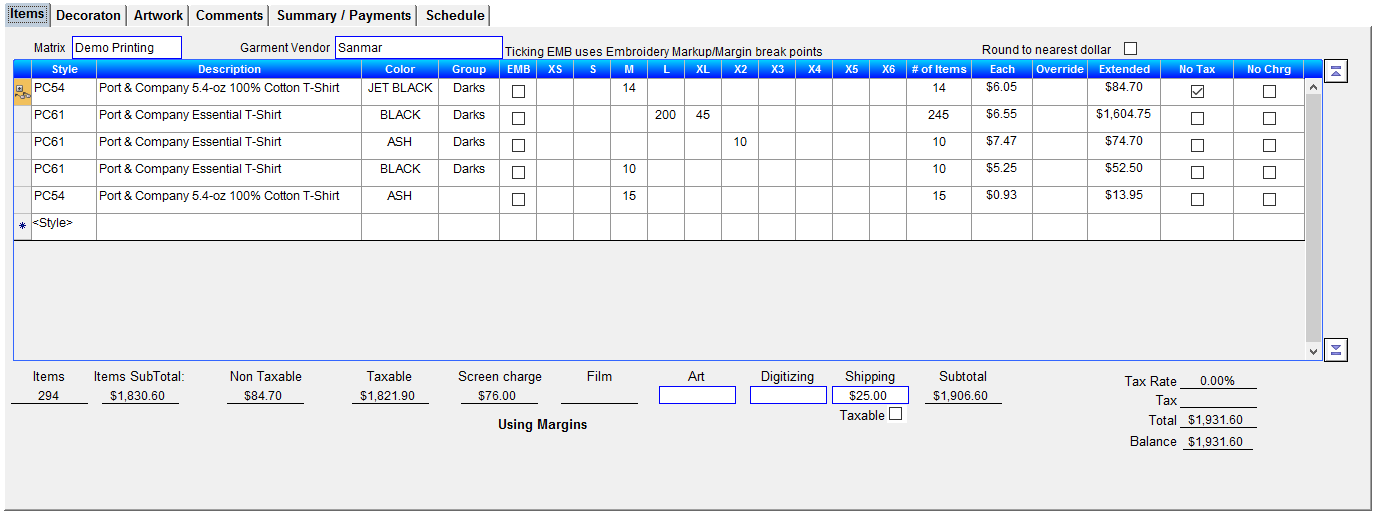
To enter a new style, click on the <Style> on the blank line. This will open the field to enter the style number. You can also click on the  down which will open up a selection list.
down which will open up a selection list.If you are just entering the style number T-Six will zero in on styles that match as each character is entered.
Only style by the garment vendor selected above will be available.
Next select or enter the garment color (optional)
Now select the "Group" (required). The group corresponds to the pricing groups in the garment catalog and tells T-Six which amount to start with when calculating the end pricing.
You can now start entering the amount of garments. You can enter quatities for XS to XL on the same line but sizes X2 to X6 must be entered on separate lines.
Once you have entered all the garments you can move on to the Decorations Tab
